

Per-element intensity is the difference between a beauty effect that flatters and one that looks processed. In the Face Beauty SDK, every element — smoothing, reshaping, each makeup piece — carries its own presentation levels: light, standard, and strong. Results read as natural because each element is tuned independently, inside a range your designers chose, rather than pushed by one global slider.
1. Product Positioning
Per-element intensity ships as part of the Meishe Face Beauty SDK — reshaping, smoothing, and makeup compositing from one detection pass, real-time, no preprocessing. Levels and looks run on iOS, Android, Web, and Desktop (Windows), extend to smart hardware, and reach the two cross-framework targets via the short-video solution. Per-element intensity is how the stack’s results stay controllable: authored levels per element, curated looks combining them, all shipping as data packages.
2. How per-element intensity works
| Aspect | How it behaves |
|---|---|
| Per-element levels | Each element presents at light, standard, strong — set by your designers, applied by the runtime |
| Independent tuning | Changing one element’s level leaves every other element untouched |
| Looks as combinations | A look applies a complete arrangement of element levels in one tap |
| User control inside the range | Users pick among authored levels; the brand approves the range they choose from |
| Content, not code | Level changes ship as package updates — no app release |
The structure mirrors how beauty professionals work: a look is many small decisions — a touch here, a defined line there — not one dial turned up everywhere at once.
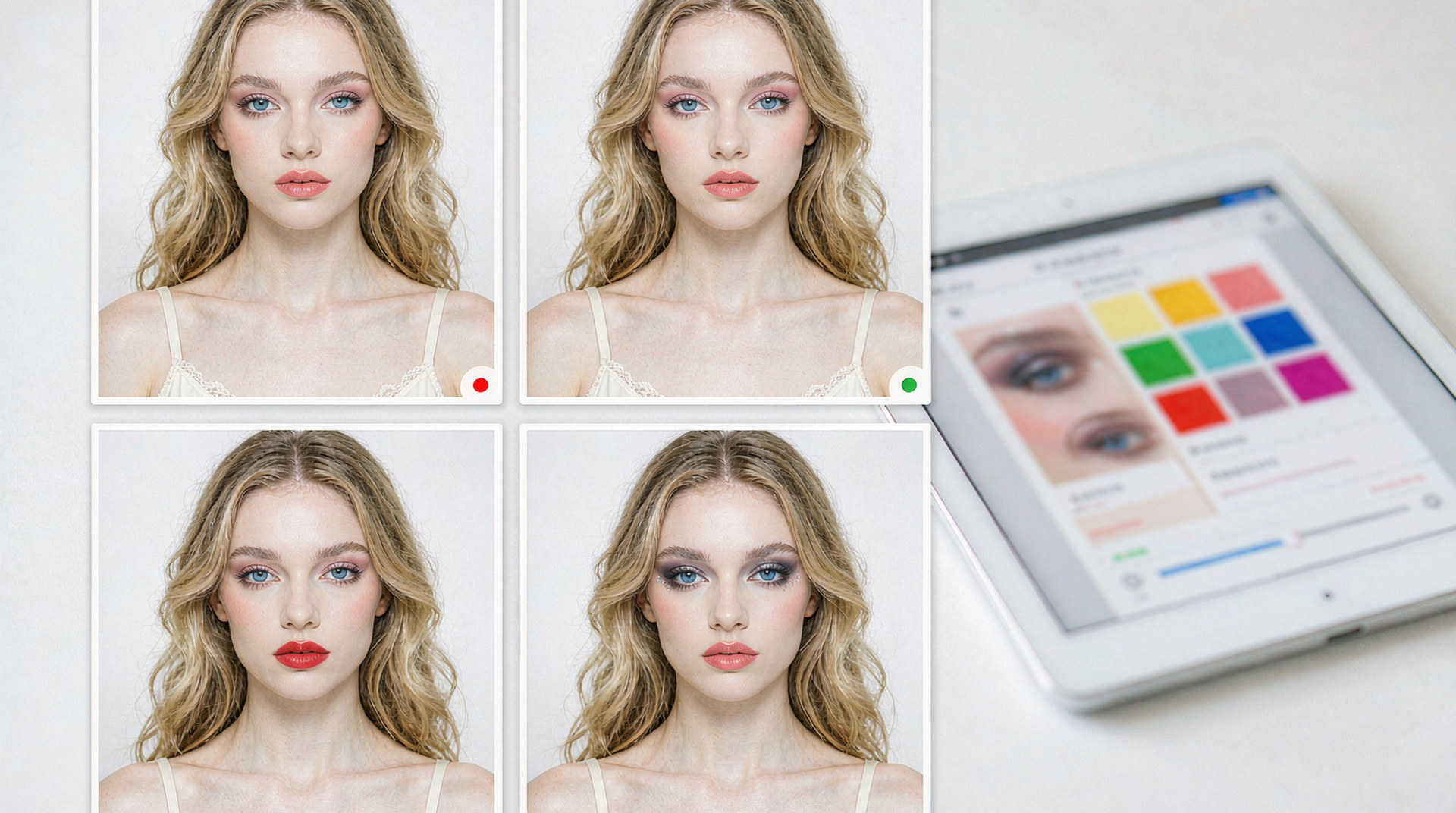
3. Why the results read as natural
Natural-looking retouch is an artifact of restraint, and per-element levels are how software expresses restraint. Three mechanisms do the work:
- Each element stays inside its flattering range. The authored levels cap how far any single effect pushes, so no component of the look overwhelms the face it is applied to.
- Balance survives user tuning. Because users choose among levels rather than dialing continuous values, the relationship between elements — the balance your designers arranged — holds no matter which options users pick.
- The default is a decision, not an accident. The standard level of each element is what your team reviewed and shipped; the out-of-box experience is the look you intended.
The snippet below is schematic. Names and signatures are illustrative, not the shipped API.
// Illustrative: a look applies; one element's level is tuned after.
import { createBeautyRuntime } from "@meishe/beauty"; // placeholder name

const rt = await createBeautyRuntime({ platform: "ios" });

await rt.looks.apply("look.workday.01");                 // balanced default
await rt.looks.setLevel("smoothing", "light");           // one element, one notch
await rt.looks.setLevel("lip.satin.maple", "strong");    // another, independently
4. What this gives a product team
- Brand-definable tone. Natural, polished, or glamorous is a matter of which levels your catalogue exposes — the product’s aesthetic ships as content.
- A tuning surface users understand. Light-standard-strong per element is a control users grasp instantly; it invites play instead of demanding skill.
- Iterative refinement at content speed. If analytics show a level landing too strong, the correction is a package edit — live to every platform, no release cycle.
5. Why teams choose Meishe
| Advantage | What it means for your project |
|---|---|
| Self-developed engine | The cross-platform audio/video processing engine used across the product family, refined through years of shipping |
| Real-time, no preprocessing | Every level change renders live on the preview |
| One detection pass | Intensity changes cost no re-analysis — the stack renders from the same per-frame data |
| Authored in the Asset Creation Platform | Levels and looks are content, published through your channel |
| Special Effects Customization | Produced looks available when you want a professional starting catalogue |
6. What shipping teams ask first
- How many levels should an element expose? Three is the proven pattern — enough range for expression, few enough to keep every combination reviewed.
- Can different products in our portfolio ship different ranges? Yes — levels are content; each product’s catalogue carries its own arrangement.
- What stops a look from feeling heavy when everything is on standard? The authored balance — your designers approve each look as a whole, not just its parts.
Per-element intensity also quietly powers A/B decisions. Because each level arrangement is content, product teams can ship two variants of a look to different cohorts and read the engagement — then make the winner the default with a package publish. Beauty tuning becomes a measurable practice rather than a matter of internal taste, and the catalogue improves with data instead of opinions.
That closes the loop the model opened: authored restraint produces natural results; data confirms which restraint users prefer; the catalogue converges on the product’s best version of itself.
One more practical reading: the levels are also a localization surface. Markets differ in retouch preference — the range a catalogue exposes per region is content, so a global product ships market-appropriate restraint without market-specific builds. The engine is identical everywhere; the manners are regional.
That is the final argument for per-element intensity: it puts the product’s judgement into the system where it belongs — in authored content — and keeps it out of the places it does not, like per-device hacks and post-launch compromises.
For teams coming from a global-slider background, the migration is worth naming: legacy presets translate into per-element looks almost directly — each old preset becomes a named arrangement of levels, and users gain the tuning the slider never gave them. The upgrade reads as respect for the user: same one-tap defaults, finer control underneath, and a catalogue that can now improve without a release.
A closing image for the whole mechanism: think of each element as an instrument with three settings and each look as the score that arranges them. The runtime performs the score faithfully on every platform; the designers conduct; the users request encores. Nothing in that chain requires an engineering ticket after launch day, and everything in it is inspectable in the authoring platform.
That is per-element intensity in one paragraph: control where it is useful, restraint where it matters, and content-speed iteration where the product lives.
FAQ
Can users mix levels across elements in one session?
Yes — looks apply a balanced arrangement, and users adjust individual elements afterward; every choice lands inside the range your team authored.
How do level changes reach shipped apps?
As package updates through your delivery channel — the binary stays untouched, and every platform picks the change up together.
Does per-element tuning slow the preview?
No. Levels change what the renderer draws with, not how much analysis runs — the stack still works from one detection pass per frame.
Can we hide the strongest level for certain markets?
Yes. The exposed range is part of the catalogue your team publishes per product — levels you omit simply do not appear.
What is the difference between a look and a level?
A look is the complete arrangement — which elements at which levels. Levels are the per-element choices inside it. Looks give users one-tap polish; levels give them the fine tuning.